Edit Unreal foliage in Blender, one instance at a time.
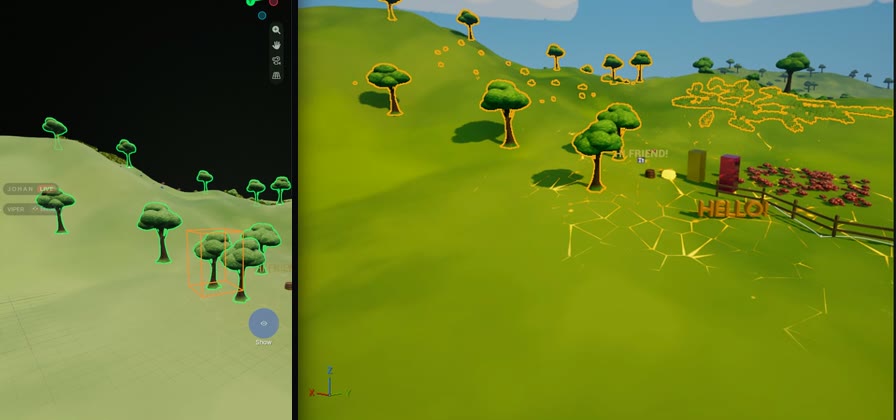
Foliage painted in Unreal and the Instanced or Hierarchical Instanced Static Mesh components on your actors come into Blender as instancers: every instance is a point, drawn as the real textured mesh at Unreal's exact transforms. Pick one tree, move it, copy it or delete it.
How it works
- Select the foliage instancer in Blender and press Tab for Edit mode.
- Move points with G, copy them with Shift+D, delete them with X.
- Leave Edit mode: the changes go to Unreal as one undo step, and the instancer is rebuilt from what Unreal has now.
Foliage stays foliage
Edited instances are placed through the Foliage Helper, so they keep their attachment to the landscape or mesh they stand on, and still follow Unreal's landscape sculpting. Instances moved into another World Partition cell move to that cell's foliage actor.
Good to know
- Foliage editing needs the Foliage Helper, which comes in the Unreal download. ISM and HISM components on ordinary actors work without it.
- Each instance keeps its own rotation and scale: moving points moves instances.
- Components a Blueprint's construction script creates stay read-only: edit the Blueprint.
- If Unreal changed the same component meanwhile, the edit is refused and Blender shows Unreal's version.
Questions
Can I edit Unreal foliage in Blender?
Yes. Each foliage component comes into Blender as an instancer. In Edit mode, move, copy or delete single instances and they change in Unreal as one undo step.
Does the foliage stay on the landscape?
Yes. Instances are placed through the Foliage Helper, so they keep their attachment and still follow landscape sculpting.
Other guides
Try it on your own level.
Every feature free for 7 days. Then a lifetime Pro licence, 50% off at launch: $24.99 instead of $49.99.