Rigs & animation
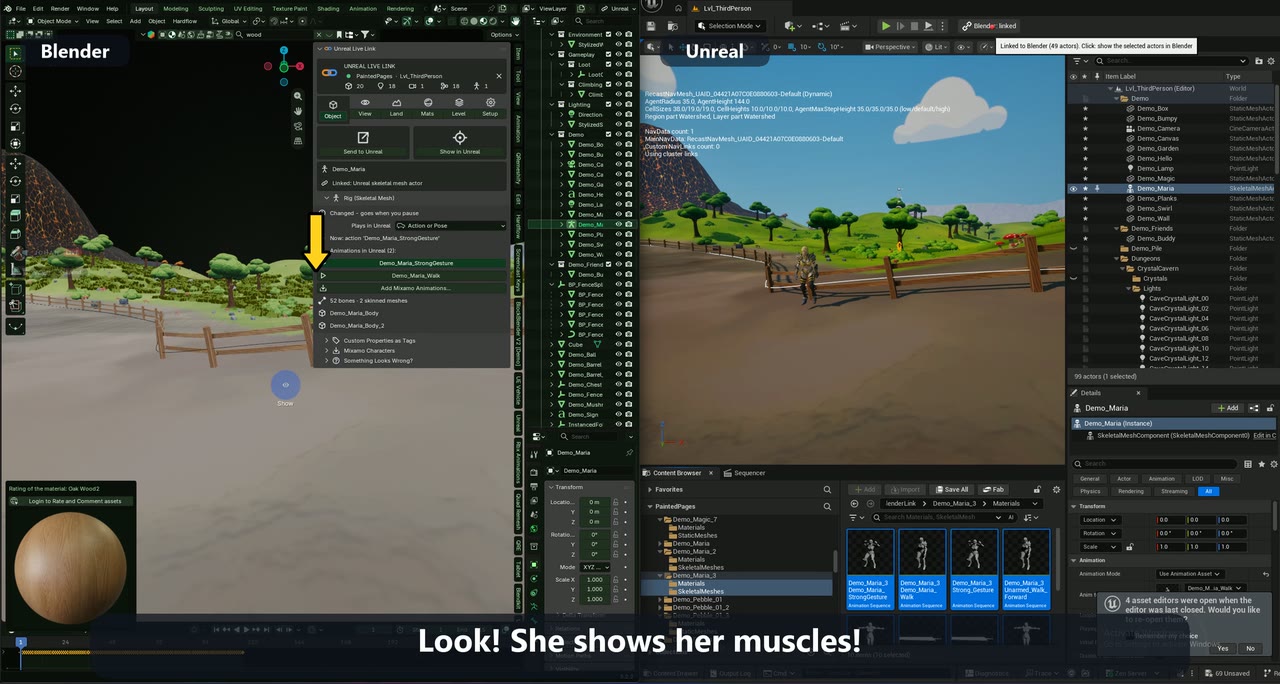
Rigs and animation from Blender, playing in Unreal.
Put an armature in the level's collection with the meshes skinned to it, the usual Ctrl+P → With Automatic Weights setup, and it becomes one Unreal Skeletal Mesh actor: skeletal mesh, skeleton and physics asset. Pose it or play an action in Blender, and the actor does the same in the Unreal editor viewport.
How it works
- Parent your meshes to an armature (Ctrl+P → With Automatic Weights) inside the level's collection, or import a Mixamo character from the Object tab.
- The rig arrives in Unreal as a Skeletal Mesh actor. Move, rotate or scale the armature and the actor follows.
- In the Rig (Skeletal Mesh) section, choose what plays in Unreal: the active action, the current pose or the rest pose.
Live
- Change the mesh, weights, bones, shape keys or materials and the rig re-imports in place about 1–2 seconds after you stop.
- Shape keys arrive as morph targets.
- An active action becomes an Animation Sequence that loops in the editor viewport; edit its keys and it updates.
Good to know
- Rigs go from Blender to Unreal. Unreal's own skeletal meshes don't come into Blender.
- Rigs always travel as GLB (glTF skin).
Questions
Can I send a Blender rig to Unreal Engine live?
Yes. An armature with its skinned meshes becomes a Skeletal Mesh actor, and changes to the mesh, weights, bones or shape keys re-import in place a second or two after you stop.
Does animation play in the Unreal editor?
Yes. Choose Active Action and the action loops on the actor in the editor viewport; choose Current Pose and the actor takes the pose you set in Blender.
More of what it does
Other guides
Try it on your own level.
Every feature free for 7 days. Then a lifetime Pro licence, 50% off at launch: $24.99 instead of $49.99.